
SCOUT Framework
A simple, repeatable framework to help you apply AI to the right kind of tasks — especially in marketing, automation, and small business operations.
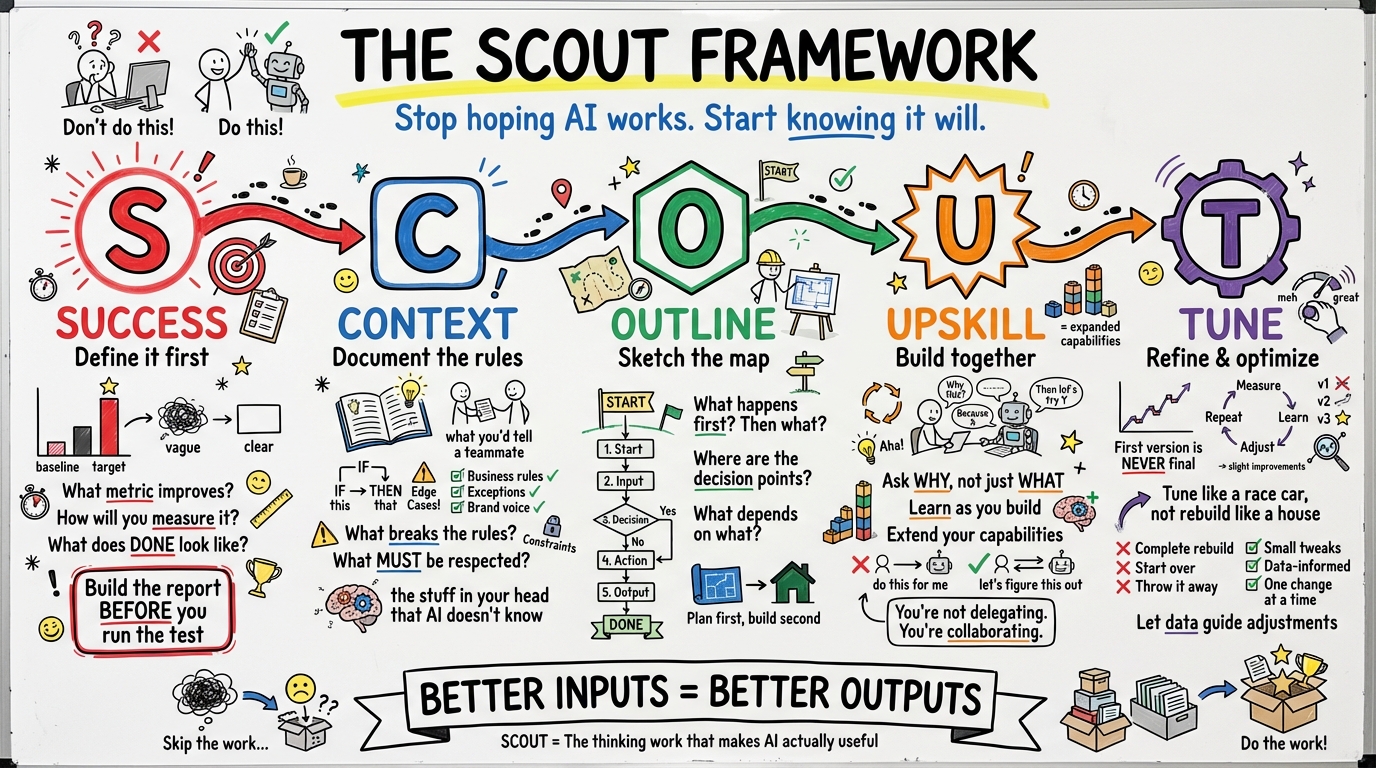
What is SCOUT?
SCOUT works best on tasks that you already do manually (or could do manually), can be tightly scoped, and are part of a larger system but standalone enough to isolate and improve.
The key insight: Most people jump straight to asking the AI to do the work. SCOUT forces clarity and precision first — so that the AI has a better shot at doing something useful.
It also builds better habits for thinking in systems, designing automations, and delegating clearly (to AI or humans).
The Five Steps
Each letter guides you through a critical phase of applying AI effectively.
S
Success
Define what success looks like. Clear, specific, measurable if possible.
C
Context
Provide background info, constraints, past attempts, preferences, edge cases.
O
Outline
Sketch the approach. What are the key steps or flow? Where should AI help?
U
Upskill
Use AI to push your thinking, extend your capabilities, or automate repeatable work.
T
Tune
Refine the result. Adjust, iterate, and improve through feedback or testing.
SCOUT in Action
See how SCOUT transforms vague requests into precise, actionable AI prompts
Example 1: Implement AI-Assisted Reporting for an Agency Team
Task: Roll out automated reporting with AI analysis for all account managers in a Google Ads agency.
Success
Every account manager receives automated weekly reports with AI-generated insights for their clients. Should reduce report creation time by 80%, improve consistency across the team, and free up 5+ hours per AM per week for strategic work.
Context
- • Team size: 8 account managers, each managing 10-15 clients
- • Current pain: Each AM spends 6-8 hours/week on manual reporting, inconsistent quality
- • Technical capability: Team comfortable with Sheets, some know basic scripts
- • Client expectations: Weekly performance summary with actionable recommendations
- • Budget: Can invest in AI API costs, need to stay under $500/month total
- • Risk tolerance: AMs must review AI output before sending to clients
Outline
- Audit current reporting process and identify what can be automated
- Build automated data pipeline from Google Ads to central sheet
- Create AI prompts that generate consistent analysis and recommendations
- Design review workflow so AMs can edit before sending
- Pilot with 2 AMs, gather feedback, refine
- Roll out to full team with training
- Monitor time savings and quality metrics
Upskill
This might involve:
- • Learning Google Ads Scripts or Apps Script for data pipelines
- • Understanding AI API costs and rate limits
- • Developing prompts that generate consistent, useful analysis
- • Creating an eval to test if AI output meets quality bar
Example prompt to start:
“Help me design an automated reporting system for a Google Ads agency. 8 account managers, each with 10-15 clients. Need weekly reports with AI-generated insights. What's the architecture? What tools should we use? How do we ensure quality control?”
You'll iterate on this prompt many times, adding context about your specific clients, what “good” analysis looks like, and edge cases as you discover them.
Tune
Pilot with 2 AMs for 4 weeks. Track time spent, client feedback, and AM satisfaction.
Iterate on:
- • AI prompts - based on what insights clients actually value
- • Review workflow - where do AMs get stuck or waste time?
- • Data pipeline - what metrics are missing or formatted wrong?
Future improvements: Add client-specific context to prompts, build a library of high-performing insights, create templates for different client types (e-commerce vs lead gen), automate the review approval process.
Example 2: Automate Adding Negative Keywords
Goal: Automate the weekly process of reviewing search terms, suggesting negatives, and optionally applying them.
Success
A system that identifies new search terms since last review, suggests which should be negatives, and lets the user approve/reject in a sheet before applying. Should reduce 30+ minutes of manual review to 5 minutes of approvals.
Context
- • Current pain: Weekly review takes 30+ minutes per account, done manually in Google Ads UI
- • Business type: E-commerce selling premium kitchen knives
- • Volume: ~500-800 new search terms per week across 4 campaigns
- • What makes a bad term: DIY/sharpening queries, competitor brands, wholesale/bulk, “free” or “cheap”
- • What makes a good term: Purchase intent, brand matches, products we sell, gift-related
- • Constraint: Human must approve before applying - never auto-apply negatives
Outline
- Pull search term data into a sheet
- Identify which terms are new since last review
- Run AI to suggest Yes/No/Maybe for each new term
- Human reviews and approves/rejects suggestions
- Apply approved negatives to Google Ads
Upskill
This might involve:
- • Learning Apps Script to connect sheets to Google Ads API
- • Understanding how to batch AI requests efficiently
- • Developing prompts that capture your business's definition of “bad” traffic
- • Testing accuracy by comparing AI suggestions to your manual decisions
Example prompt to start:
“For each search term, suggest if it should be added as a negative keyword for a premium kitchen knife e-commerce store. Output Yes/No/Maybe. YES for: informational queries, competitor brands, wholesale, wrong intent. NO for: purchase intent, our products, gifts.”
You'll refine this prompt as you discover edge cases - terms that should be negative but AI misses, or good terms AI flags incorrectly.
Tune
Run for 2-3 weeks and track AI accuracy against your overrides.
Iterate on:
- • Prompt wording - add examples of tricky terms AI gets wrong
- • Decision criteria - refine what “purchase intent” means for your business
- • Confidence threshold - should “Maybe” default to human review?
Future improvements: Add campaign-level context to prompts, track which negatives actually improved performance, build a “learned exceptions” list AI can reference, extend to other accounts with similar products.
Example 3: Write an FAQ Section
Task: Create a short, helpful FAQ section for a key customer question.
Success
An FAQ block with 3–5 clear, accurate, friendly answers to a top customer question. Ready to publish on the product page. Should address the concern directly, build trust through specifics, and reduce support tickets asking this question.
Context
- • Product: Organic dog shampoo (lavender scent), $24.95
- • Question to answer: “Is this safe for puppies?” - asked 15+ times/month
- • Audience: Eco-conscious dog owners, often first-time puppy owners
- • Brand voice: Warm, knowledgeable, reassuring
- • Trust signals available: Vet endorsement, 847 reviews, PetSafe certification
- • Goal: Reduce support tickets by answering on product page
Use AI to suggest what context might help: “What information should I include when writing a helpful, trustworthy FAQ answer for a dog shampoo product?”
Outline
- Gather product facts and safety information
- Draft FAQ answer with AI assistance
- Review for brand voice and accuracy
- Add to product page
- Monitor if support tickets decrease
Use AI to co-create the outline: “Given this question and product, what 3–5 key points should I cover in an FAQ?”
Upskill
This might involve:
- • Gathering all product safety documentation in one place
- • Learning to write prompts that capture your brand voice
- • Understanding what makes FAQ answers reduce support tickets (specificity, trust signals)
- • Testing different answer formats with a few customers
Example prompt to start:
“Write an FAQ answer for: 'Is your lavender dog shampoo safe for puppies?' Tone: warm, knowledgeable, reassuring. Include: safe for 8 weeks+, pH balanced, vet endorsed by Dr. Sarah Chen, tested on 200+ dogs. Keep it under 100 words.”
You'll iterate on tone, length, and which trust signals resonate most with your audience.
Tune
Publish and monitor for 2-4 weeks. Track support ticket volume for this question.
Iterate on:
- • Answer content - are people still asking follow-up questions?
- • Tone and phrasing - does it match other site copy?
- • Placement - is it visible enough on the product page?
Future improvements: Build an FAQ template system for other products, create a brand voice guide AI can reference, track which FAQs have highest engagement, A/B test different answer lengths or formats.
What SCOUT Helps You Do
Break down problems
Before throwing them at an AI
Avoid the blank page
Clear structure beats staring at a prompt
Improve over time
Systematically refine workflows
Use SCOUT to:
Whether you're a freelancer, agency, or small business owner — SCOUT keeps you grounded, clear, and consistent.
SCOUT: A Learning Loop
AI isn't just something you use — it's something that helps you grow.
U = Upskill
Leverage AI to sharpen your craft, build automation, or push your thinking
T = Tune
Iterate like a pro. Refine, adapt, and improve your system or output over time
This isn't prompt → output → done.
It's system design. It's craftsmanship. It's you, in the loop — better every round.
Related Framework
SCOUT is for individual task automation. For coordinating AI transformation across your organization, see the Summit-Scouts-Trekkers Framework — the people framework where leadership defines the destination, scouts build the path, and the entire organization moves forward together.

“It will definitely change the way I work this year.”
— Elaine Liaw

“The Brain now runs my actual workflow.”
— Benjamin Häntzschel

“Unbelievable stuff that has changed the way we operate.”
— Patrick Gilbert
Put SCOUT to work
Get templates, examples, and community support to implement this framework.
Join Ads2AI Now →